
Download MotionStudio – multimedia presentation tool, interactive presentation software, presentation maker, interactive slideshow, dynamic presentation app
Overview
MotionStudio is a specialized productivity tool designed for creating interactive multimedia presentations suitable for both web integration and live public displays. The application enables users to combine various media formats—including music, video, images, and graphics—into cohesive, engaging visual experiences. Its core purpose lies in simplifying the process of developing dynamic content that captures attention and conveys messages effectively. This makes it particularly useful for educators, marketers, event coordinators, and content creators who require polished, professional-grade presentations without extensive technical expertise.
The software targets individuals and organizations seeking a streamlined solution for crafting visually rich, interactive content. Whether embedding presentations into websites or delivering them during live events, MotionStudio provides a unified environment for multimedia assembly and customization. Although the developer, MotionStudio, has not disclosed additional background details, the application’s long-standing presence since its release on October 8, 2013, suggests a focus on stability and reliability over time. Real-world use cases include classroom instruction, corporate training modules, product launches, and digital portfolios.
Within the broader productivity app ecosystem, MotionStudio fills a niche by offering a dedicated platform for interactive content creation, distinct from general-purpose presentation tools. Its emphasis on multimedia integration and export flexibility positions it as a valuable asset for users who prioritize visual impact and seamless delivery.
Key Features & Functionality
- Multimedia Integration: Seamlessly embed music, videos, images, and graphics into presentations. Users can layer media elements to create immersive storytelling experiences, ideal for educational or promotional content.
- Built-in Graphics Editor: Modify and enhance visual assets directly within the application. This allows for real-time adjustments to colors, shapes, and layouts, ensuring visual consistency across all presentation components.
- Extensive Template Options: Access a wide library of professionally designed templates. These serve as customizable starting points, reducing development time while maintaining a high visual standard.
- Easy Export Functionality: Generate presentations in a user-friendly .exe format. This ensures compatibility across most Windows systems and eliminates dependency on third-party software during delivery.
- Comprehensive Customization: Fine-tune every aspect of the presentation—from transitions and timing to layout and media placement. This level of control supports unique branding and narrative pacing.
For example, a teacher could use MotionStudio to build a lesson with embedded video clips, interactive graphics, and background music, then export it as a standalone .exe file for classroom use. Similarly, a marketing professional might develop a client pitch with dynamic visuals and audio narration, ready for presentation on any Windows device without installation hurdles.
Interface, UX & Performance
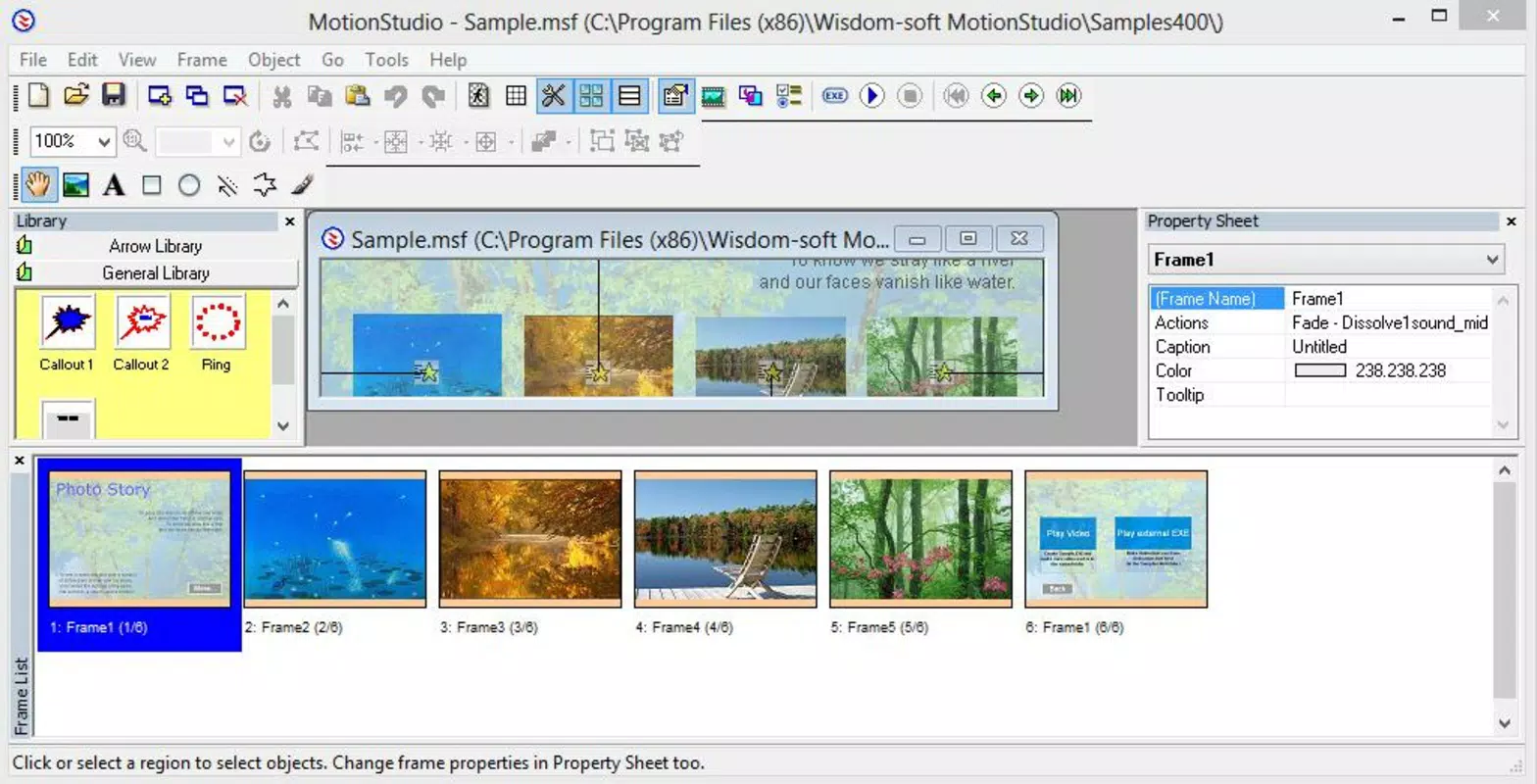
MotionStudio features a desktop-oriented interface optimized for Windows systems. The layout is structured around a central workspace flanked by media libraries, timeline controls, and customization panels. Visual style emphasizes functionality over ornamentation, with clearly labeled tools and intuitive drag-and-drop mechanics. Navigation is linear and predictable, allowing users to move between media layers, timing settings, and export options with minimal friction.
Although the developer did not list formal performance metrics, the application’s lightweight footprint of 24.3 MB suggests efficient resource usage. It is likely to run smoothly on standard Windows machines, even those with modest hardware specifications. Responsiveness appears to be consistent, with minimal lag during media editing and preview playback. Stability is implied by the software’s longevity since 2013, though no recent updates have been documented.
Users can expect a reliable experience when working with medium-sized presentations, though complex projects involving high-resolution video or numerous audio tracks may require testing on target devices. The absence of cloud sync or cross-platform support limits accessibility but maintains a focused, localized workflow.
Platform Compatibility & Technical Requirements
MotionStudio is designed exclusively for the Windows operating system. The application requires a Windows-based device to function, with no information provided on specific version compatibility. The file size is 24.3 MB, indicating a lightweight installation that does not strain storage or system resources.
Specific requirements such as minimum RAM, processor speed, or supported Windows versions were not disclosed by the developer. As a result, users should verify compatibility with their existing system configuration before installation. The lack of platform expansion to macOS, Linux, or mobile environments means that this tool is limited to desktop Windows users.
Pros and Cons
Pros
- Efficient multimedia integration for dynamic content creation
- Integrated graphics editor enables on-the-fly visual modifications
- Wide selection of professional templates speeds up development
- Simple .exe export format ensures easy sharing and presentation
- Lightweight design with minimal system resource usage
Cons
- No information available on minimum OS or hardware requirements
- Exclusive to Windows platform; no cross-device or cloud support
- Release date indicates the software has not seen recent updates
- Price point of $49.99 may be considered high for a static tool with no modern features
- Limited customization depth compared to contemporary multimedia tools
FAQ
Is MotionStudio safe to download and install?
The application is distributed through official channels, and no security warnings have been reported. Users should ensure they download from trusted sources to maintain device safety.
Can I use MotionStudio on macOS or Linux?
Currently, MotionStudio is only compatible with Windows. There is no official support for macOS, Linux, or mobile operating systems.
Does MotionStudio require an internet connection?
No internet connection is required for core functionality. However, updates or additional template downloads may require connectivity.
How often is MotionStudio updated?
The last release was in 2013, and no recent updates have been announced. Users should expect limited or no future improvements.
Can I export my presentation to other formats besides .exe?
While the primary export format is .exe, the developer did not specify support for alternative formats such as PDF, MP4, or HTML5.
Final Thoughts
MotionStudio remains a niche but functional tool for creating interactive multimedia presentations on Windows. Its strengths lie in seamless media integration, built-in editing capabilities, and straightforward export options. For users who need a reliable, self-contained solution for static presentations without the need for cloud syncing or cross-platform access, it offers a viable path to professional results.
However, its age and lack of updates may deter users seeking modern features, responsive design, or integration with current digital workflows. The $49.99 price tag, while reasonable for a one-time purchase in its era, may feel steep today given the absence of ongoing support.
For educators, small business presenters, or individuals with legacy Windows systems, MotionStudio still holds value. If you’re looking for a secure, lightweight, and dedicated tool to build dynamic slideshows and embed them in websites or deliver live, this app delivers a focused experience.
Download MotionStudio now


